
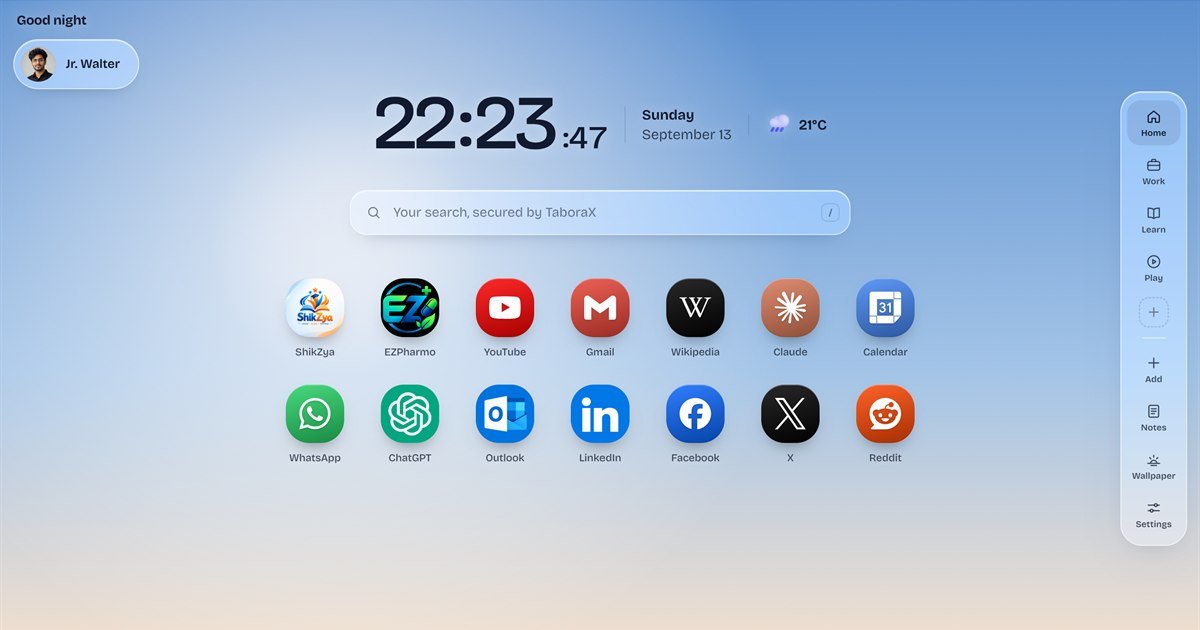
The new tab is the page you open more than any other. Most people see it dozens of times a day, and most people either leave it blank or install an extension that asks to read and change all their data on every website, just to show a few shortcuts. Neither is a good deal. TaboraX is our answer: a new tab page that holds your sites, your notes and your tasks, looks the way you want, and does not watch what you do in the rest of your browser.
What TaboraX Is
TaboraX is a new tab extension for Google Chrome, Microsoft Edge and Brave, built in Kathmandu by ZilFox Technologies. It started as an internal tool. Our team opened dozens of tabs a day and kept typing the same addresses, so we built a new tab page that already knew where we were going. Once it was useful to us, we made it public. Install it, open a new tab, and your speed dial, folders, notes, search and clock are all there before you have finished pressing Ctrl + T.
Speed Dial That Looks the Way You Want
Add a site in two clicks and then decide how it appears: the icon, the letter, the colour, the label and the size. TaboraX fetches site icons automatically, or you can upload your own. Drag any shortcut to the spot you want, choose how many sit in a row, set the corner roundness from square to circle, and hide the labels for a cleaner grid. There is no limit on shortcuts. When one screen fills up, they carry on to the next page, and you move between pages by swiping, clicking the dots under the grid or pressing the arrow keys.
Folders for Work, Study and Everything Else
Drop one shortcut onto another and you have a folder. Name it Work, College or Sunday, put as many sites inside as you like, and open the whole folder in tabs with one click. For anyone who starts every morning by opening the same six tools, that single click is the feature they end up using most. Folders are unlimited on every plan, including the free one.
A Safety Check on Every Link You Save
When you paste a link to save it as a shortcut, or type a web address into the search bar, TaboraX checks it with Google Cloud Web Risk. If it looks like phishing, malware or unwanted software, you see a plain-language warning before it is saved or opened. A shield in the search bar shows the result as you type. The warning is advice, not a block, so you can still choose Add anyway for a link you trust. Only the address is checked, plain searches are never sent, and TaboraX does not store the addresses it checks. To be clear about the limits: this protects the links you save and type into TaboraX, not every page you visit, so keep your browser's own safe browsing switched on as well.
Notes and To-dos Where Your Day Starts
The new tab is where you land between tasks, which makes it the right place for the small things you would otherwise forget: the Wi-Fi code for the meeting room, the quotation you have to send, the invoice you need to chase. TaboraX puts a quick note and a to-do list on the page itself. Tick a task off and it is done, with no separate app to open and no account needed to start.
A New Tab You Actually Want to Look At
The default background is a live sky that moves with your clock, from first light to deep night, and it is drawn by the page itself, so there are no heavy images to download. You can also pin a moment you like, such as Dawn or Golden hour, or upload your own photo and dim or blur it. The clock and icons switch between light and dark text so they always stay readable. The clock can show seconds and 24-hour time, a weather widget shows conditions where you are, and the calendar works in both AD and BS (Bikram Sambat), which matters if you plan your week around Nepali dates.
What It Asks Permission For, and What It Does Not
Every browser extension has to list what it is allowed to do before you install it, and this is where TaboraX is most different. It asks for four things: to show your new tab page, to show icons for your shortcuts, to search with your default search engine, and your location for the weather, which you can switch off. That is the whole list. TaboraX cannot read or change the websites you visit and has no access to your browsing history, bookmarks, downloads or open tabs. There are no analytics, no ads, no sponsored tiles and no search redirects, on any plan. Your homepage and default search engine stay exactly as you set them.
Sync Across Computers, End-to-End Encrypted
Without an account, everything stays in your browser and never reaches us. If you want the same new tab on your work laptop and your home computer, you can create a free account and your shortcuts, folders, notes, to-dos, settings and profile photo follow you. That data is encrypted in your browser before it is sent, using AES-GCM with a 256-bit key made from your password on your own device, so our servers only ever hold a copy we cannot open. The honest trade-off is that we cannot unlock it for you either: if you reset a forgotten password, data synced before the reset cannot be decrypted. Accounts are protected with email confirmation codes, bcrypt password hashing and a 15-minute lock after five wrong passwords.
Pricing: Free Until 31 December 2026
TaboraX has three plans, and during the launch promotion all three are free until 31 December 2026, with no card and no sign-up needed. X Spark stays free after that and covers unlimited shortcuts and folders, search, the clock, the live sky, the AD and BS calendar, and the link safety check with SafeSearch. X Flow adds notes and to-dos, full icon and layout controls, photo wallpapers and local weather, and will cost $30 a year from 1 January 2027. X Flux adds encrypted sync across devices, priority support and early access, at $50 a year. Paid plans are activated with a code and do not renew on their own, so there is no surprise charge. If you do not upgrade, nothing you built is deleted; it waits on your device.
How to Install TaboraX
Download TaboraX from taborax.com and add it to Chrome, Edge or Brave. Open a new tab and it replaces the browser's own new tab page straight away. If the browser asks whether to keep the change, choose Keep it. To go back at any time, turn it off on the extensions page. Before uninstalling, export a backup from Settings, General, Backup, because the browser removes an extension's local storage when you remove the extension.
Why We Built TaboraX
At ZilFox we build software that does one job properly and stays out of the way, the same thinking behind afnoCA, our accounting software for Nepali businesses. Most new tab extensions either do too little or take over your browser. TaboraX sits in the middle: useful the second it opens, fast, and private by default. Try TaboraX free, and if you have a feature you want us to build next, tell us.